
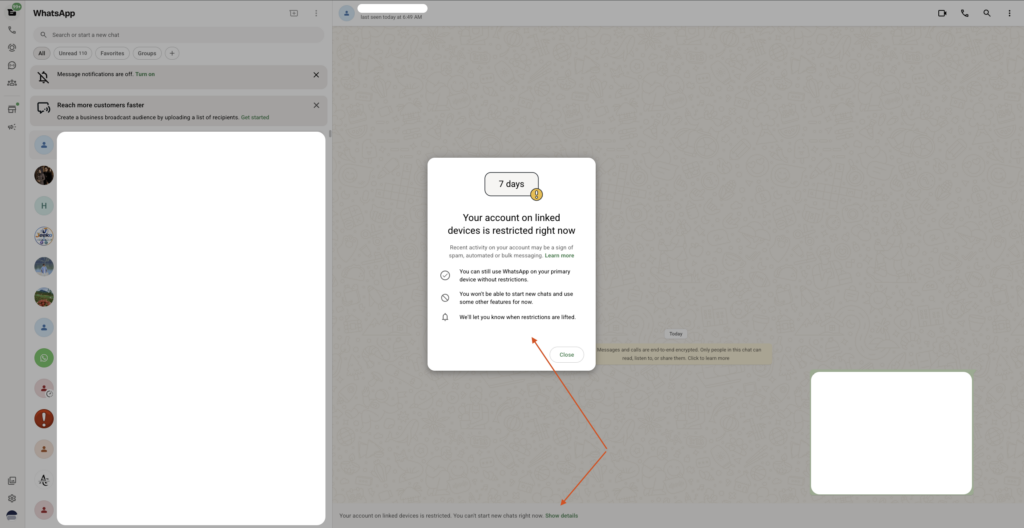
Lately, some devices have been experiencing an issue where messages are successfully sent but return a state 0. This state prevents the message from being delivered to the target.
This issue usually occurs when the WhatsApp number is:
WhatsApp has recently introduced a Reach-out Time-lock as they prepare to launch a quota system for sending new messages or initiating calls.
Important Note: If your number is affected by this time-lock, there is unfortunately nothing we can do from the Fonnte side at this moment. We have not yet found a technical workaround for this server-side restriction.
Ask user to message first : without exchanging keys, send first is blocked. incoming message is coming with valid keys, therefore the reply is now become available
Change the Number: Since this restriction is applied per specific phone number, the only definitive solution is to switch the connected WhatsApp account. You can change your connected number at any time.
Blue Tick Verification (?): We do not currently have information on whether subscribing to a "Blue Tick" (Meta Verified) resolves this issue. If you have tested this, please let us know.
Belakangan ini, beberapa perangkat mengalami masalah di mana pesan berhasil dikirim (sent) namun mendapatkan state 0. Kondisi ini menyebabkan pesan tidak tersampaikan ke penerima.
Masalah ini biasanya terjadi ketika nomor WhatsApp:
WhatsApp baru-baru ini memperkenalkan fitur Reach-out Time-lock sehubungan dengan rencana mereka menerapkan sistem kuota untuk pengiriman pesan atau panggilan baru.
Catatan Penting: Jika nomor Anda terkena reach-out time-lock, mohon maaf saat ini tidak ada yang bisa kami lakukan dari sisi Fonnte. Kami belum menemukan solusi teknis untuk mengatasi pembatasan langsung dari server WhatsApp ini.
Minta penerima chat duluan : tanpa pertukaran keys, kirim duluan akan dibatasi. pesan masuk akan memberikan keys, sehingga membalas pesan jadi memungkinkan
Ganti Nomor: Karena pembatasan ini berlaku per nomor telepon, satu-satunya solusi saat ini adalah dengan mengganti akun WhatsApp yang terhubung. Anda dapat mengganti nomor yang terkoneksi kapan saja.
Verifikasi Centang Biru (?): Kami belum memiliki informasi apakah berlangganan Centang Biru (Meta Verified) dapat menyelesaikan masalah ini. Jika Anda sudah mencobanya, silakan informasikan kepada kami.
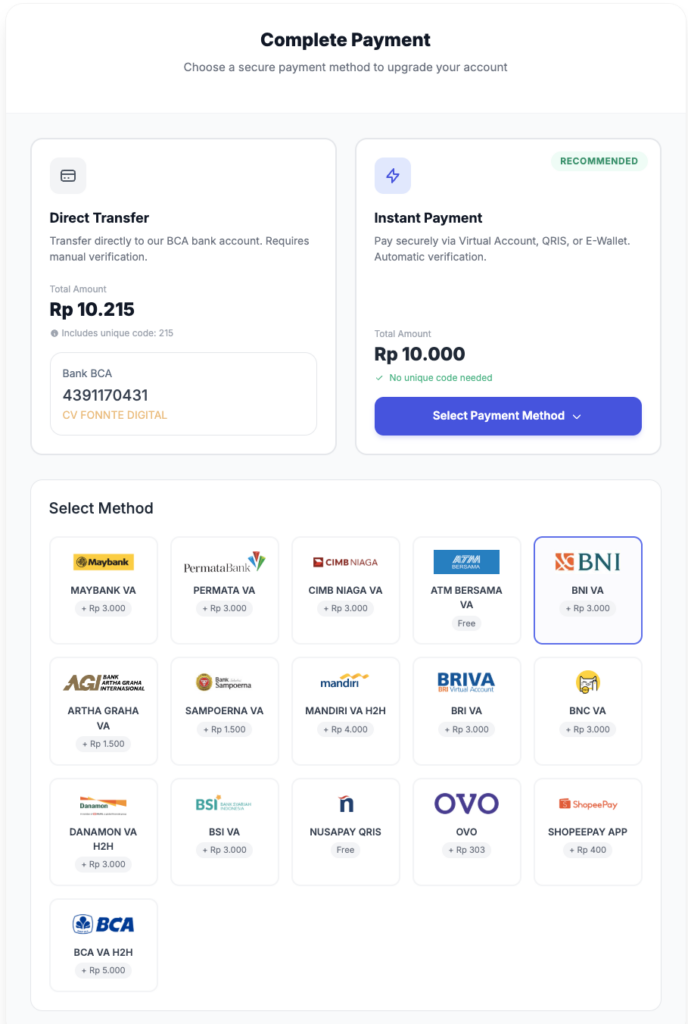
we are now using payment gateway for your convenience. there should be no longer has issue for minutes payment approval due to issue on the scrapper. instant payment approval is the expected one for now. but we still offer to pay manually just for fallback manual approval
when we built ai for fonnte, it's quite basic and sometimes got the answer wrong or incorrectly refering to some unknown data. we plan to deprecate it on 1 june 2026. all remaining quota will be fully refunded. currently we are recommend to use aksita.ai instead for better dedicated ai response
currently message history are not deleted at all. since we see that all older messages are occasionally opened, we plan to keep only last 3 month of messages. this changes will be implemented together with ai data and ai quota deprecation at 1 june 2026. you can download it before 1 june 2026 to keep your messages active
Since fonnte system devices also occasinally got banned, we are now requiring email for fallback when the whatsapp devices are got banned. we are trully sorry for this inconvenience
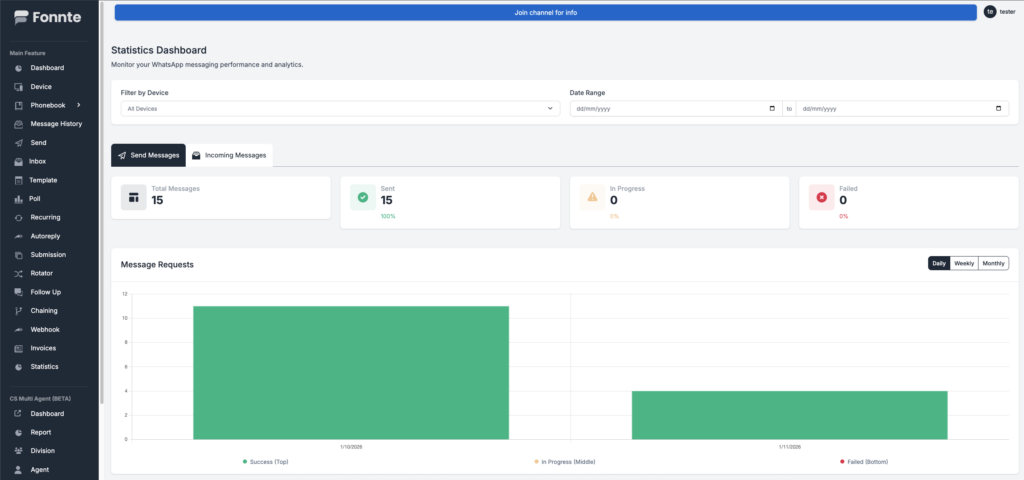
We are now adding statistic to see your usage at fonnte both outgoing and incoming messages. these statistic works as data to see periodic data so you can see your usage behaviour better.
Previously we are automatically resend webhook after failed immediately at 3 times. but this might cause unintended issue that the client network issue might still persist during retry. so we are changing the behaviour to 15 times every minute instead of immediately. this might solve temporary DNS issue, network issue, rate limit issue, etc. webhook also mandatory to return status of 200 to be considered success
Timestamp of the message is now added to the webhook. so you can log better when the message is received by whatsapp.
We are adding capabilities to add message refering to send API. this empower send API to be able to behave like replying message. previously webhook message cannot be replied using message reference, but now, using inboxid it's possible!
Webhook no longer need to have GET and POST method. fonnte will now do POST only.
we are adding reschedule api for rescheduling the message when you are having to change the schedule time or change delay
when the plan is expired, the device is updated to free plan.
if there are pending or scheduled messages that should be sent during the device expired, the messages are sent with branding "sent via fonnte" due to current device plan is free even though it's generated when the plan is non-free.
we are updating the workflow to keep the message to be sent with same plan when the message are requested.
so now even though your device is expired and on free plan, the message should still sent using plan when the message is requested.
this update add fairness to the user's plan.
example : request are created yesterday with regular plan, but planned to be sent tomorrow. today is expired and the device become free plan. tomorrow, the message is sent without sent via fonnte branding even though current plan is free
By default, fonnte automatically set typing indicator to mimic real human behavour 1 second before actually the message. but some users need more flexibility. so, we are adding "duration" as parameter in integer. you can now use 'duration'=>10 for example to set typing indicator 10 seconds before actually send message
we are now adding typing API so you can freely generate typing simulation for long webhook process or when waiting response for AI. this is beneficial to add presence to your user so you don't just hanging and waiting for response which now lead to better UX
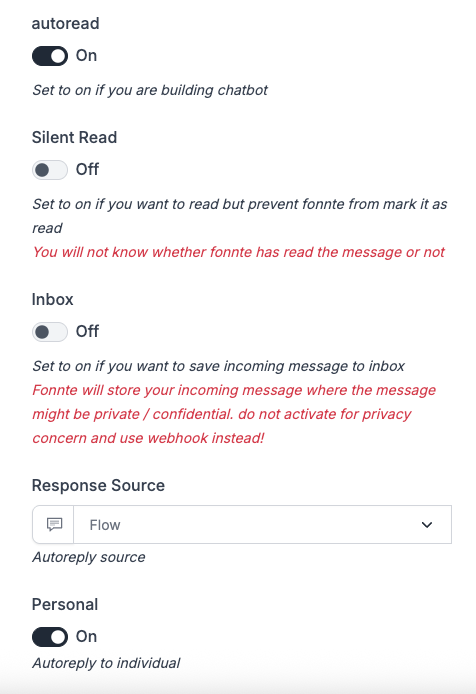
many of our users ask for this feature. silent autoread enable fonnte to reading the message without actually mark it as read. so you can still get the notification theoritically while enable fonnte's autoread power.
you can now send file directly using google drive link. previously to send attachment, fonnte need actual url like : https://domain.com/image.png.
but now you can use google drive link like https://drive.google.com/file/d/1bqn_S9lmHVNaKjwq7LSpjeUAsFVrRVQR/view?usp=drive_link
Fonnte AI service is quite basic and often meet challenge & inaccurate when used on more data. this can cause halucination which is undesired. that's why we now integrate with Aksita AI for providing AI service come to fonnte. you can see the tutorial here
Currently fonnte has AI feature to integrate AI with fonnte. but this AI are intended to do basic response. like we just have the AI to response. we got some users report that our AI is answering using wrong data or even hallucination. that's why now we will integrate with aksita ai for more focused AI service.
to use aksita integration, you need to :
you can get the tutorial for it in the aksita tutorial page.
only after you have the api key, you can continue to integrate to aksita AI
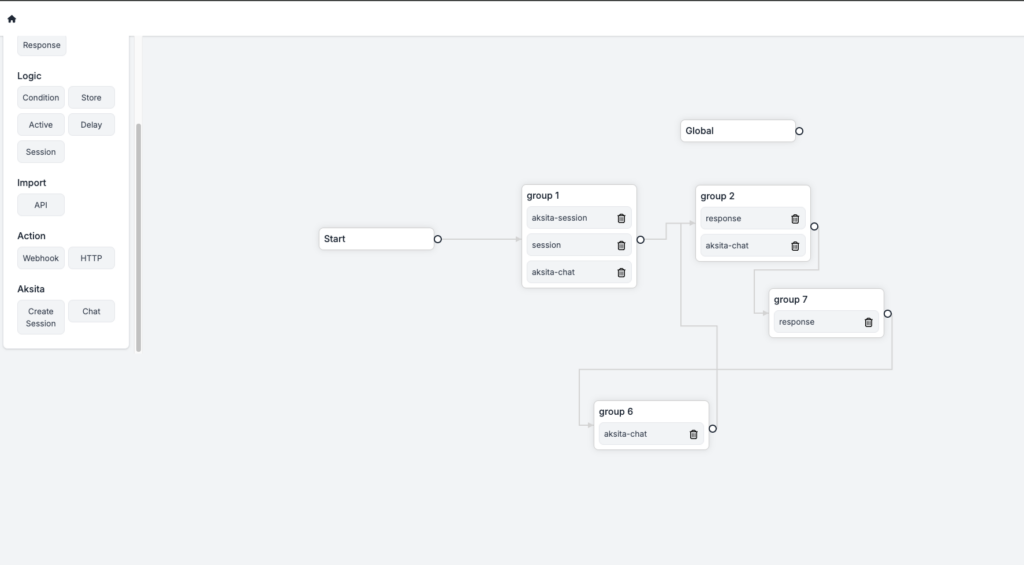
We will use flow to integrate aksita with fonnte by creating aksita nodes below :
First we create session for each conversation.
then we store the variable using store node.
after that, we need to immediately respond via aksita chat node.
for maintaining history chat, we will need to make a loop for it by adding more response->chat node->response
then connect it back to first chat node.
Now we have api key from aksita.
first we copy it and paste on session node and both chat node.
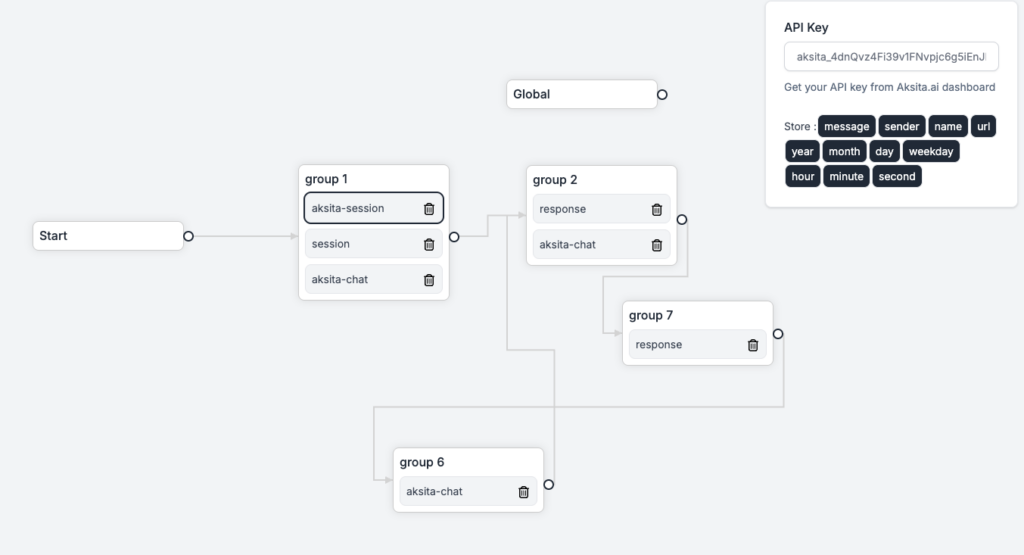
then we go to store node and make variable for session data.
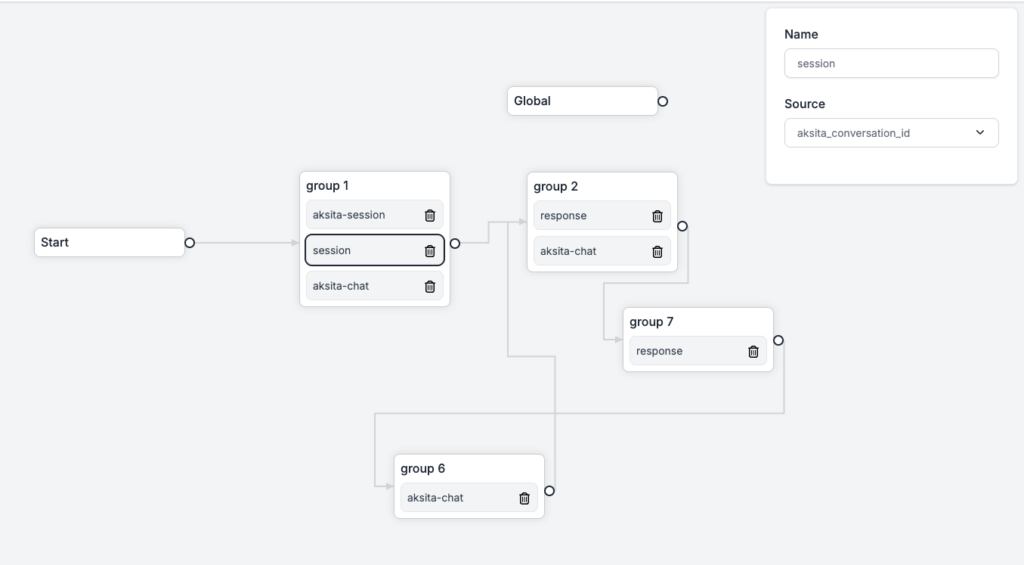
last thing is we set session id with sessios variable.
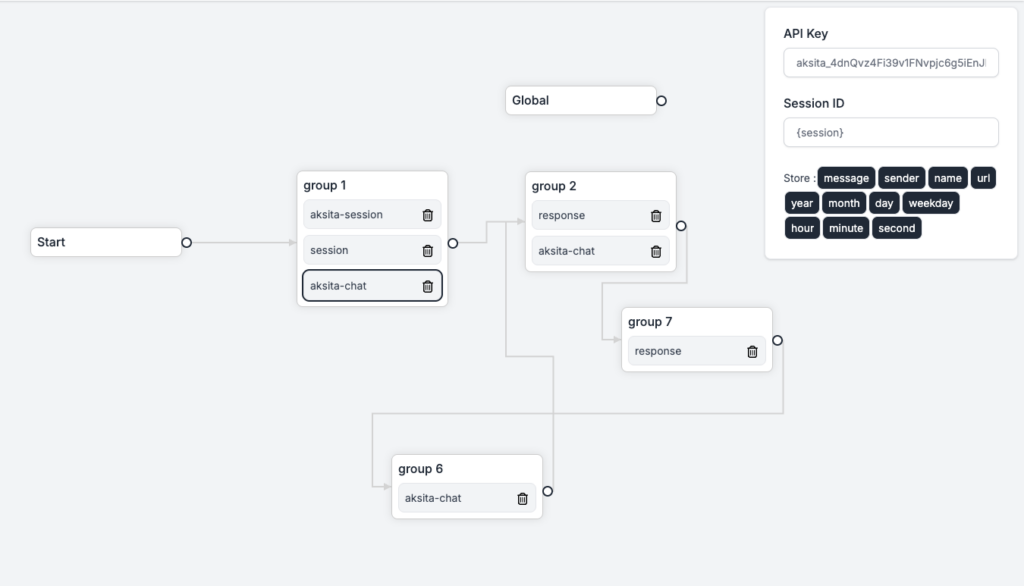
do the same for the rest of aksita chat node.
that's it.
when done, you need to check on device->edit that we need
Typing api enable you to simulate typing and creating typing indicator on whatsapp.
this is beneficial for adding presence that you are being thinking/answering the message or just simulate typing, especially on long awaited answer like waiting AI to response or your webhook need to process something and take a bit longer than a second.
you can see it on postman.
<?php

$curl = curl_init();

curl_setopt_array($curl, array(
  CURLOPT_URL => 'https://api.fonnte.com/typing',
  CURLOPT_RETURNTRANSFER => true,
  CURLOPT_ENCODING => '',
  CURLOPT_MAXREDIRS => 10,
  CURLOPT_TIMEOUT => 0,
  CURLOPT_FOLLOWLOCATION => true,
  CURLOPT_HTTP_VERSION => CURL_HTTP_VERSION_1_1,
  CURLOPT_CUSTOMREQUEST => 'POST',
  CURLOPT_POSTFIELDS => array('target' => '08123456789','countryCode'=>'62','duration' => 10,'stop'=>false),
  CURLOPT_HTTPHEADER => array(
    'Authorization: TOKEN'
  ),
));

$response = curl_exec($curl);

curl_close($curl);
echo $response;
Available parameter
WhatsApp has been updating its core messaging infrastructure over the past several months. These updates are being rolled out gradually across different regions worldwide. Indonesia was not among the first locations to receive these changes, which is why our messaging system has remained stable and unaffected until now.
However, we have recently started receiving these system updates, and they may impact how messages are sent and received through fonnte.
One of the key changes WhatsApp is introducing is something called "@lid". Think of this as a unique identifier that WhatsApp assigns to each account. Based on what we're observing, this "@lid" appears to be the foundation for a future "@username" system—similar to how Telegram or Instagram works.
What this likely means: WhatsApp plans to eventually allow users to communicate using usernames instead of exposing actual phone numbers. This would provide better privacy and security for users.
Since WhatsApp is implementing "@lid" gradually, we need to prepare our systems to work with this new identifier. This means:
We are actively working to integrate these changes into fonnte. However, since WhatsApp itself is still migrating gradually, we're monitoring the situation closely to understand the full scope of required changes before implementing them.
Important note: We don't have a specific timeline yet because WhatsApp's internal migration is ongoing and unpredictable. Rest assured, we are prioritizing this work and will implement updates as quickly as possible while ensuring stability.
We will keep you updated with regular progress reports and provide advance notice before any changes go into effect.
This API is used to reschedule message that have been wrongly scheduled.
<?php
$curl = curl_init();
curl_setopt_array($curl, array(
CURLOPT_URL => 'https://api.fonnte.com/reset-message',
CURLOPT_RETURNTRANSFER => true,
CURLOPT_ENCODING => '',
CURLOPT_MAXREDIRS => 10,
CURLOPT_TIMEOUT => 0,
CURLOPT_FOLLOWLOCATION => true,
CURLOPT_HTTP_VERSION => CURL_HTTP_VERSION_1_1,
CURLOPT_CUSTOMREQUEST => 'POST',
CURLOPT_POSTFIELDS => array(
'id' => 1, //message id
'delay' => '5-10', //optional
'schedule' => 1758606641, //unix timestamp
'byschedule' => false, //optional
),
CURLOPT_HTTPHEADER => array(
'Authorization: TOKEN'
),
));
$response = curl_exec($curl);
curl_close($curl);
echo $response;
TOKEN must be filled by your own token. See how to get token.
Available parameter :
We are making small changes and updates in the middle of the year due to urgency that needs to be adjusted.
We are adding more information in the register page for better register instruction.
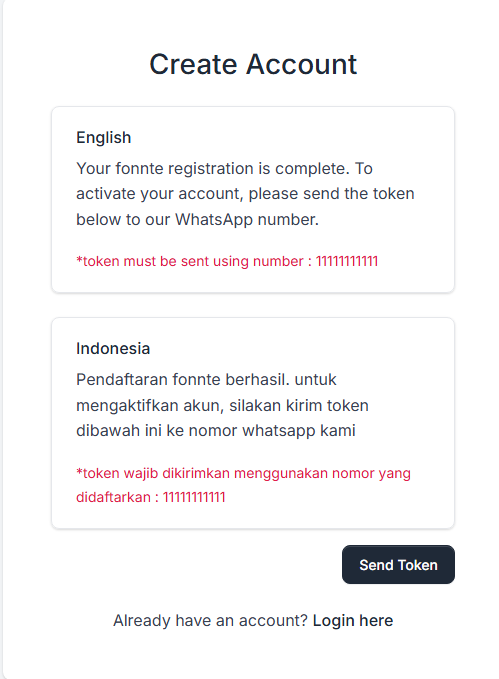
Free plan will no longer receive notification on disconnect/connected device.
Notification on disconnect/connected device will be sent only on non free plan device.
this action must be taken due to fonnte currently has many active free devices and as intended, they are testing and developing.
therefore, disconnect/connect devices is expected to be often happened.
this action raise concern about volume and risk to our whatsapp notification system.
we are also prevent message with certain content as a preventive measurement from abusing free plan.
We found a case where the token got exposed, either the attacker can access the enviroment or get in the code, that causing unauthorized usage.
therefore we are adding whitelist IP to ensure the request coming form allowed IP.
this is just one of security feature from fonnte.
but the ultimate security should come from the client side to take care of the token.
We are getting report that a device got banned due to send message to unknown grup or a group that the whatsapp is not joined yet.
therefore, we are adding verification for group id that ensure the whatsapp had joined the group.
if you got failed response "id group invalid", please do update your whatsapp group list at phonebook->wagroup->update list.
Kamu akan menerima notifikasi setiap kali login.
Jadi kamu tahu jika ada yang berhasil login ke akun kamu.
Kami menambah fitur ini utamanya untuk alasan keamanan data karena di menu message history dan inbox menampilkan riwayat pesan yang dikirim/diterima.
pesan ini bisa bersifat rahasia seperti OTP/password atau hal pribadi lainnya.
Jika yang login bukan kamu, segera hubungi kami.
Kami menambah opsi untuk login dengan OTP.
fitur ini menambah keamanan dashboard fonnte.
tanpa OTP, kamu tidak bisa login.
Jadi pastikan whatsapp kamu selalu aktif untuk menerima OTP.
kamu bisa mengubah nomor whatsapp di menu setting->whatsapp
Kami mengerti bahwa beberapa developer membuat dashboard sendiri untuk manage fonnte dari dashboard mereka.
beberapa developer mengalami kendala dimana mereka perlu beulang2 mengecek sisa kuota sebelum melakukan aksi.
Karena API device profile ini terbatas, kami menambahkan informasi kuota di setiap pengiriman pesan.
Memang penambahan kecil, tapi akan berguna untuk yang memerlukannya.
Flow mendapatkan fitur lagi yang berfokus di fitur global.
Global ini dijalankan setiap ada pesan masuk.
Ini sangat berguna untuk membuat rules tersendiri, seperti menambah delay sebelum merespon.
Tentu hal ini bisa dilakukan dengan menambah satu per satu. tapi akan lebih mudah dengan fitur global karena hanya sekali setting.
Ada bug yang membuat autoreply tidak bekerja karena kesalahan di kode terkait inboxid.
bug ini sudah di fix
Everytime you login, you'll receive a notification.
you can know if someone successfully login to your account.
if it's not you, you must reach us immediately.
we are adding this feature for more security mainly due to message history and inbox is displayed in the dashboard.
some have credentials like OTP or password or else which no one should look onto it but you.
We are adding option to use OTP to login.
this feature adding another layer for fonnte's security.
without OTP, you cannot login.
please make sure your whatsapp number is always active.
you can change your whatsapp number on setting->whatsapp.
We are aware that some developers create their own dashboard to manage fonnte.
some face challenges that they need to repeatedly check the quota before proceeding some action.
while API device profile is limited, we are adding quota on every usage.
this is a little addition, but should helpful for those who need it.
Flow gaining more feature that focused on global feature.
global feature will be fired everytime the bot got a response.
this is beneficial for making set of rules, like adding delay before responding.
it is indeed can be done by adding one by one, but having global setting is very handy.
There is a bug that autoreply won't reply due to faulty in our code regarding inboxid. this bug has been fixed