
We are adding more features in this early february 2025.
the focus of this update is to add more features and more optimization.
TL;DR
more features and optimization :
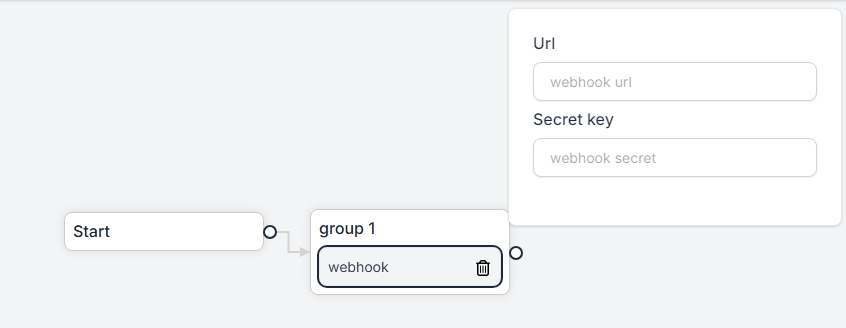
Webhook are now can use secret key for additional data to verify it's coming from fonnte
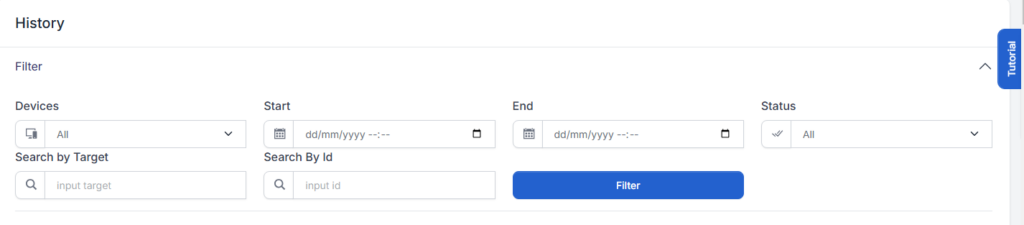
you can now search message by it's id.
it's useful when looking for specific message data.
this is developed for inbox support.
When deleting message that is already on process, the processed message cannot be cancelled.
now you can cancel it by deleting it from message history.
for example : you are sending 5 messages with delay 10 seconds. then you realize there is an error in the message. previously, you cannot cancel it. but now, by deleting it from message history, it will not processed anymore.
As fonnte's user growing, There are a more users who use API send complaining about their request is invalid/not exactly as their requested.
but when fonnte ask what is their request, they are not storing their request so it can easily be one side blame "it's fonnte's fault" instead of figuring out together which request data should be adjusted.
so we are taking initiative to help logging the request, so we can both examine the request and response together to create more win win solution environment and ultmately can assist user better.
the request id is exist in every API send response whether it fail or success.
Previously, we are processing all incoming message for user who activate autoread to on.
this task, can take many spaces and computational power as whatsapp grow with many new data.
we are now limiting what to process and not, so we can reduce our server usage and lead to better performance.
fonnte will store incoming message on demand.
you can enable it by activating autoread and inbox in the device->edit menu.

When using webhook, we cannot quote the chat we are replying to.
now there is additional data named inboxid.
when activate inbox, webhook will also have inboxid to be used as quote data.
so on reply, you just need to add inboxid in the API send.
Fonnte use BCA scrapper to autoconfirm payment.
but lately, the scrapper got more and more not reliable.
some order have been paid but not processed until it changed to failed.
so we take another approach (since we still not deciding to use payment gateway yet), we add deposit.
this is more likely not to be used by most of users, because the nature of deposit : you are paying upfront to be used later, while fonnte also having custom duration order.
so most of users are not expected to use deposit.
then, who are using deposit?
we are introducing API order together with this deposit system and autoconfirm system.
this is more likely to be used as autoconfirm payment for business to integrate seamless and easily with fonnte, together with device management API.
Autoconfirm is used to autoconfirm the order when you make an order to fonnte and choose to use deposit.
this way, you can right away activate your order without waiting for BCA scrapper or manual process.
this is most beneficial for business.
API order is now available to be used to make an order right from your own system.
to use API order, you need to have deposit in your account.
without it, your order will always failed as order through API order will be autoconfirmed.
see API order documentation or go to postman.
When downloading an attachment, sometime the file is corrupted.
especially if the file is large enough.
we fix this and the attachment should now correctly downloaded.
You can now order fonnte's package right from your application.
this way, device API is now fully usage in your own application.
see it on postman.
<?php

$curl = curl_init();

curl_setopt_array($curl, array(
 CURLOPT_URL => 'https://api.fonnte.com/order',
 CURLOPT_RETURNTRANSFER => true,
 CURLOPT_ENCODING => '',
 CURLOPT_MAXREDIRS => 10,
 CURLOPT_TIMEOUT => 0,
 CURLOPT_FOLLOWLOCATION => true,
 CURLOPT_HTTP_VERSION => CURL_HTTP_VERSION_1_1,
 CURLOPT_CUSTOMREQUEST => 'POST',
 CURLOPT_POSTFIELDS => array('plan' => 1,'duration' => 1,'duration-value' => 1,'ai-quota' => 500,'ai-data' => 0),
 CURLOPT_HTTPHEADER => array(
 'Authorization: TOKEN'
 ),
));

$response = curl_exec($curl);

curl_close($curl);
echo $response;
Available parameter
note :
We once provide inbox until 2021 we got some complaint and decided to close the inbox feature.
this inbox is just collection of incoming message.
but several user use their personal number to connect to fonnte, so some private chats are stored.
while fonnte do not use it for anything but process the message, some users are not satisfied.
so we close this at that time.
begining 2023-2024, as fonnte's user grow significantly, the inbox feature request is on demand.
we still lock in our previous decision to not enable it and suggest using webhook instead.
many of our user is not familiar with coding.
so we had a fight for the decision of opening it or not.
we come to conclusion that we will rebuilt our inbox feature along with ability to reply.
but in one condition, the user is allowing the incoming messages to be stored.
so we are not without consent storing all incoming messages.
Logic is category that allow you to create logic for your flow.
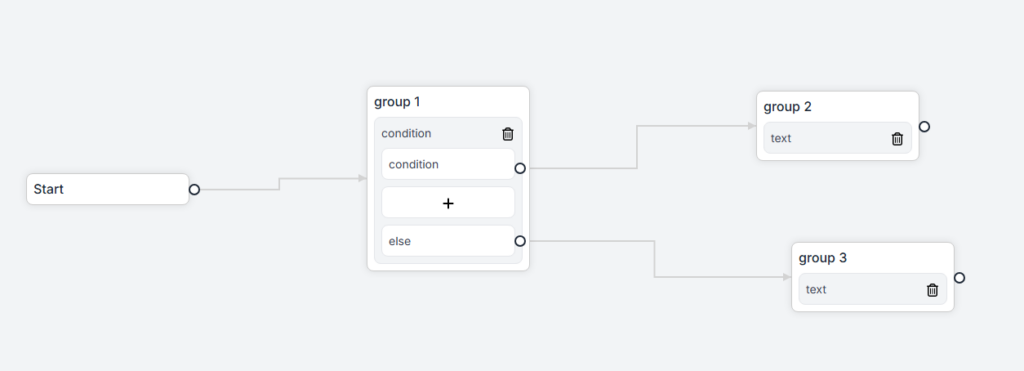
currently we have condition and store logic.
you can make condition for the flow.
if a condition is met, should go to item A.
if not met, should go to item B.
Store is used to store any last response or API response to a variable you can use later.
store can store message, name, sender and url.
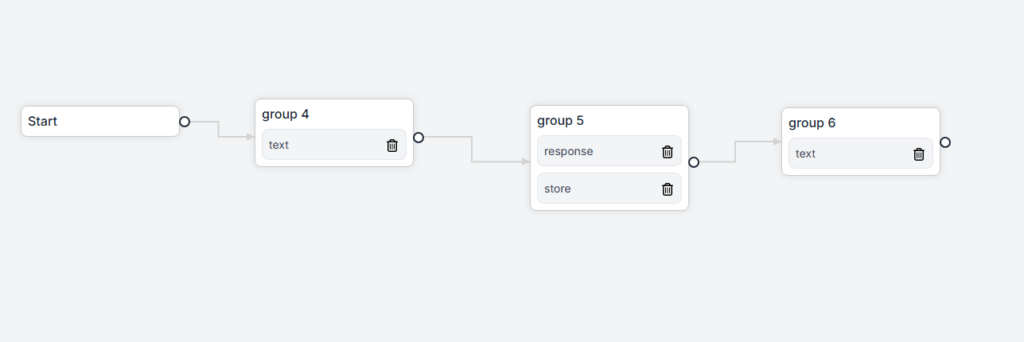
Response is used to wait for user's response.
the flow will stop whenever hit response.
on user response, the flow will then continue
Message is a type of the message to be sent to reply incoming message.
currently we have 3 items under message category.
Text is used to reply using simple text only message.
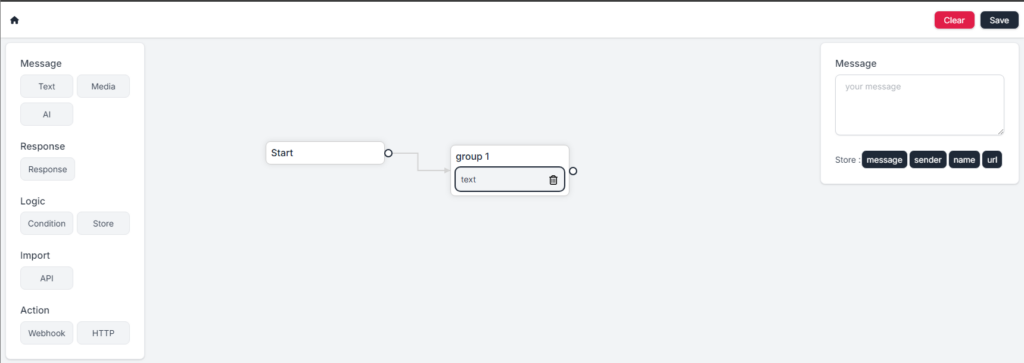
you can type the text message to response.
Media is used to send attachment with or without caption.
but there is no upload feature, you need to provide your own file.
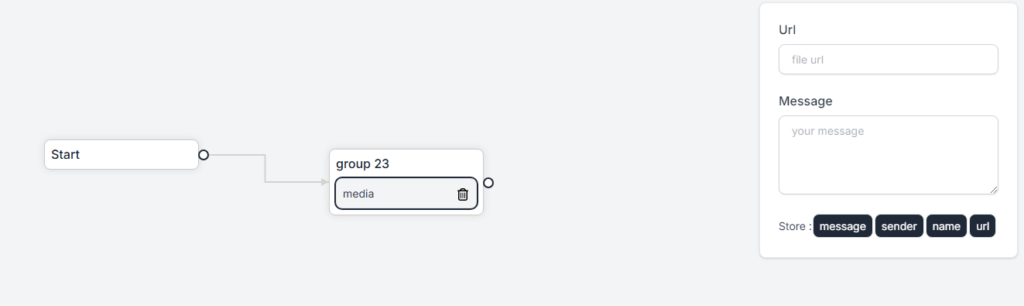
AI is used to reply the message using AI using your own data.
You can get more info about it in the docs about AI
By default, flow will behave as following:
flow is designed to reply, not to send message first.
therefore, you can only reply incoming message
every items in flow will start from "start".
this is fresh starting point when the user is considered new to chat with.
if no arrow line coming from "start", flow will not working.
Every item can only have one arrow line.
Item cannot be connected to multiple items.
Items cannot go back to where it is coming from in a single trip.
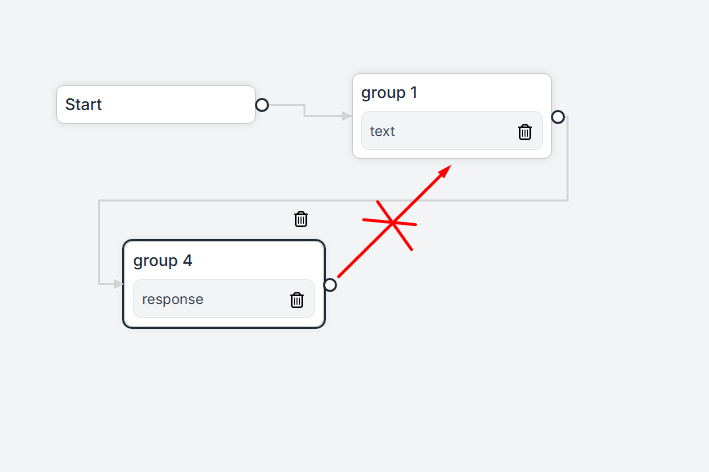
But you can add more items and go back to it if needed.
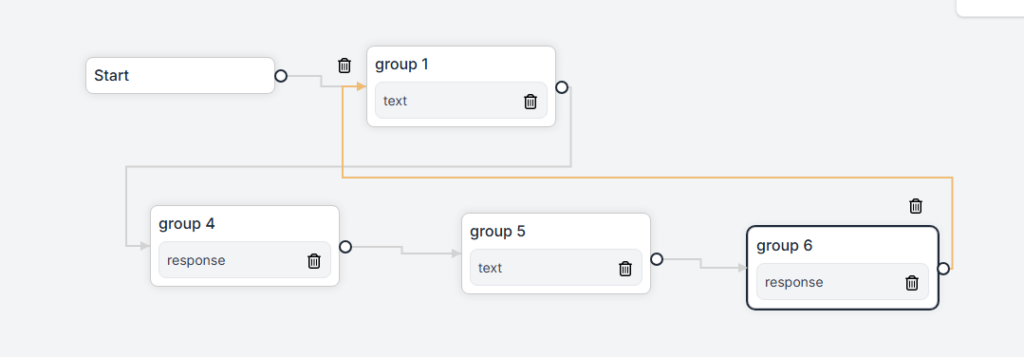
this way, it won't be single trip and can be done.
By default, flow will automatically send as soon as requested.
there is no delay on the flow.
in the beginning of 2025, we have already make some improvement to fonnte. we are adding features and changing some expected behaviour on fonnte.
Delay now starts on first target. previously, delay only works on multiple target. this is, while good to force single target to immediately sent and prevent any delay, this behaviour is not expected by most of our user. so we have changed the delay behaviour to delay each target, regardless the number of target.
We are adding flow to make chabot building easier. this is actually same as autoreply, chaining and submission but visually. even better, you can combine them all if you need them.
also, AI only supported via flow
if you are using AI, you can set the AI to have their own behaviour.
Fonnte allow your AI to use your own data. using this data, your AI will act like personal assistant for your knowledgebase.
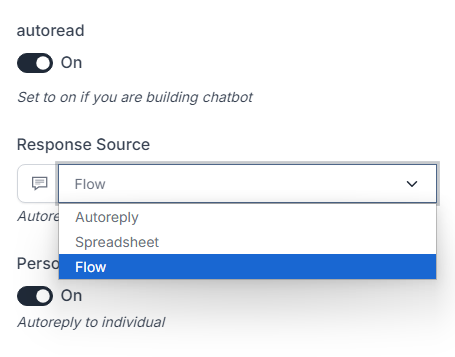
We have added response source in the device->edit. we have now 3 response source. you can choose response from autoreply, spreadsheet, or flow.
spreadsheet still can only be used on regular plan and above it.
we are not planning to deprecate autoreply, chaining, and submission, or at least not yet.
but using flow is much greater and easier due to it's visual interface.
we encourage to build autoreply from flow.
We also make order easier by adding custom duration and lifetime order for AI quota and AI data.
you can now order for 3 months or any month/year, all based on your needs.
for many end users, using variable like 081|admin|fonnte indeed helps a lot. but it has limitation.
we are adding spreadsheet to the rescue. it's as easy as excel.
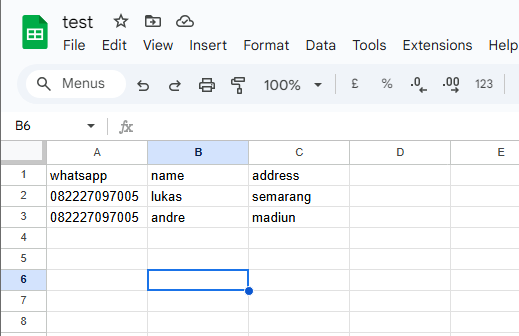
this spreadsheet removing the needs of predefined variables in fonnte, like name,var1,var2 etc.
you can use your own variable name.
but still, you need 1 variable named "whatsapp" for target number.
for other names, it's up to you.
Our server also now have been optimized even more to handle more request and more dependable.
Flow is a "must have" feature in no code chatbot building.
fonnte already have several features like autoreply, chaining, and submission before but it's hard to visualize.
it also has it's own limitation.
so it's finally the time to move it all to flow.
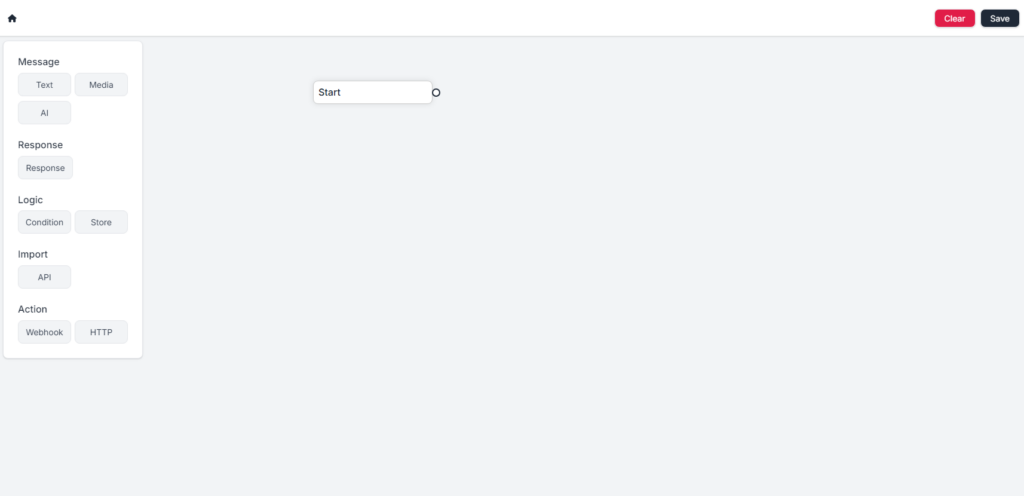
all items are categorized in message, response, logic, import and action.
you can drag and drop an item in the menu to make an element.
then, you can link them to make the flow.
you can also clear the flow to reset all flow.
the save button is to save your flow.
everytime you save the flow will reset all path on your existing chats.
so all user that currently having chat with your chatbot will have to start over.
All package is eligible for using flow, even free one without limit.
To activate the flow, you need to edit your device :
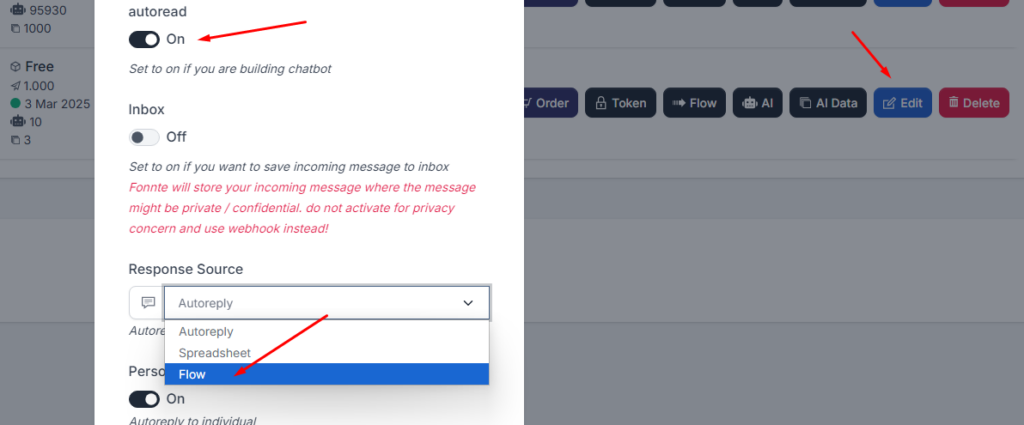
that's it.
you're good to go.
By default, AI do not use chat history.
every incoming chat is a new chat.
so it will behave differently than chatgpt and doesn't remember past conversation.
to enable history, you need to make a loop in the flow setting.
create 2 ai and 2 response, then link them circular.
example : ai 1 -> response 1 -> ai 2 -> response 2 -> ai 1.
it's easier to show an image
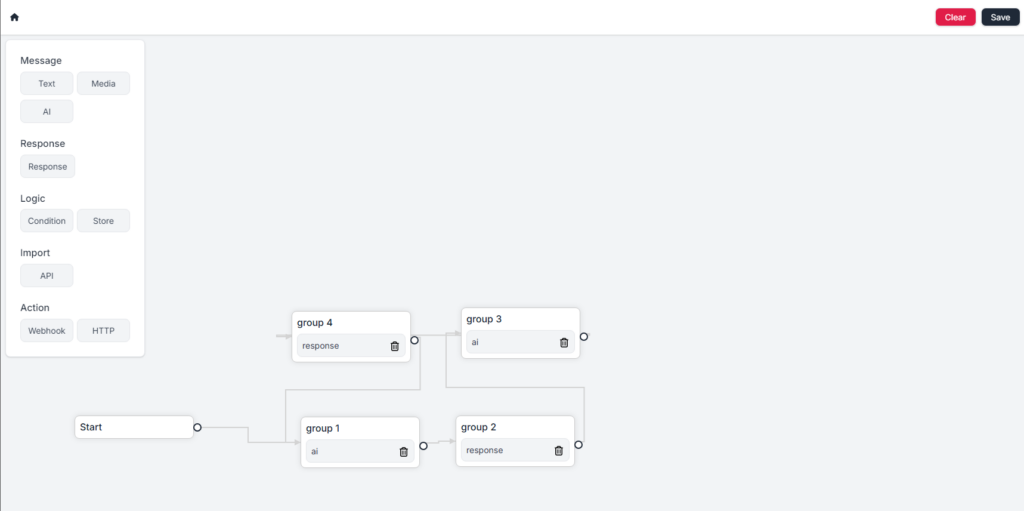
by using this flow, your ai will remember history and can answer better.