
When adding your own data, sometime you'll face a problem where your ai answer is not based on desired data.
This is typically happen when your data is related each other, but highly similar.
for example, one data about register, one data about login, one data about reset password.
sometime the ai score chooses "login" data when the actual chat is about "cannot login".
therefore, "reset password" data is the actual data you expect to have highest score.
let's dig deeper.
using previous case, why would i need to separate them to 3 data?
i can merge them and use 1 data instead!
yes, this is one of the correct approach.
with longer data, it means broader data range.
it's reserving overall topic, so you should not worry too much.
but still, if you still have another data that having similar topic, the problem will still exist.
this solution will only works, if you combine all related content as one data.
but, this also raise another issue, your cost will possibly increase.
so the second solution is to cut it to super specific short data.
only around 200-500 characters.
the data must super specific and not overlapping another data.
for example, "register","login","reset password".
this share common topic : account.
therefore, you need to rephrase your data to be very specific to each data about "register","login" and "reset password".
| Long | Short |
|---|---|
| + Keep the context | - separate context |
| + easily do comparation and get related data | - cannot do comparation and related data is hard to get |
| + easier to maintain | - harder to maintain |
| - less precise | + more precise |
| - cost more | + cost less |
| - slower response | + faster response |
example : register, login, reset password
example : pricing, api documentation, step by step data
after cut the data short, you can also add some addition information and categorize it.
with this action, your data will obtain additional context and the ai would understand better.
inside the data, you can also add some keyword related to the data.
for example : Instead of "our lite plan," use "our lite plan includes API and webhook support.
do avoid ambiguity inside the data.
avoid "all plans have basic feature", instead use : "all plans include API and webhook support".
You can also add more example to it so AI can enhance it based on your example model.
for example in the documentation, fonnte offer some example in PHP.
this can be included as example.
other thing is add incoming message example.
so you can add something like :
question example : "how to order?","how much is ai quota price?"
we cannot ask ai to always correctly use specific data from our collection of data.
ai works using the power of statistic, which means it's all about probability.
what can we do is increase the probability by using known best practice above and let the statistic works as is.
After adding your own data and having ai quota, now you think about how it works.
let's made up a scenario where you have 3 data, each is around 1.500 characters length.
every data have their own score.
When you add any data, fonnte under the hood is generating and saving it's score.
around 1.500 characters on your data cost 1 ai quota.
when a chat is coming, fonnte will give it a score, then compare it with all of your data's score.
the highest score relative to the question will be choosen.
but the data then will once again compared to the current chat and previous chat history.
it will compared once again with complete chats history.
then we have another highest score data.
after that, we will compare both highest data.
if they're not equal, then both of them is relevant to the chat and necessary to answer the question.
so the cost now is not just 1, but 2 due to additional data.
if the data is short enough and the total is less than 2000-2500 characters, your cost will more likely to be just 1.
but 2 might not the final cost you'll be charged.
there is also "hidden" cost that may occur due to your ai behaviour.
you may use chat history to make the chat flow is smooth, more like chatgpt behaviour.
this behaviour cost you more, can be around 1-2 additional ai quota depend on the chat history length.
if you do not use history, your ai might not remember previous chat, so it will behave like new chat.
this behaviour will not add cost for incoming data and the final incoming cost more likely to be 2 at most of the case.
for response length, typically it will cost just 1.
but it the response is too long, it might get 2 or 3.
as long as we tried during development, most of our response cost 1 ai quota and rarely got 2.
it's including our lengthly code generation for our api example.
your outgoing chat cost will more likely to be 1 at most of the case.
so, in the end, your total cost is typically 2-3 ai quota.
from the incoming cost is typically 1-2 a quota.
while the outgoung cost is typically 1 quota.
but still, might go up to 5 ai quota due to 1-4 incoming data, and 1 outgoing data.
ai data is a menu to add more information to your ai.
this is useful to add your own data so ai can use this data to respond to your user.
this data has maximum 10.000 characters each.
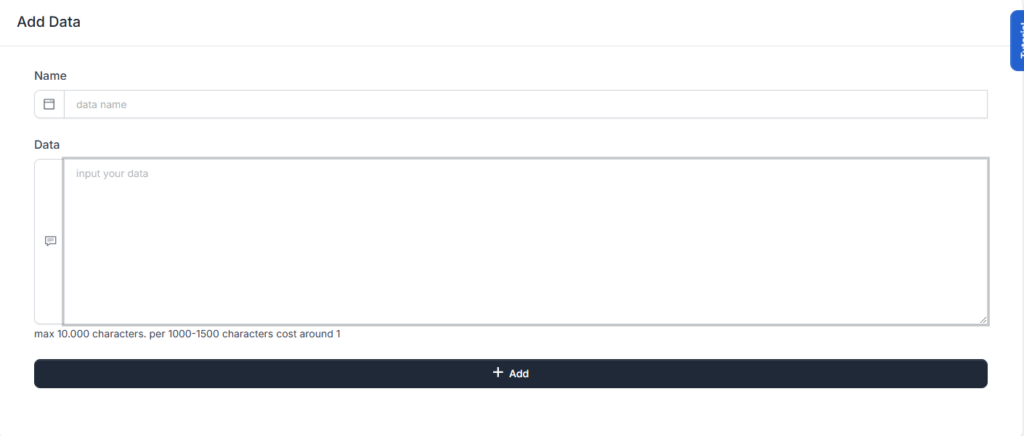
To add data, you will need data allowance.
as a start, every device will have 3 allowance.
you can delete/edit old data and create new data.
for 2.000 - 2.500 characters, it will be using 1 ai quota when used.
if your data around 8.000-10.000 characters, everytime this data is used, you will be cost al least 4 ai quota.
the more characters you have, the more expensive it is to be used.
to be able to send ai message, you need ai quota.
the ai quota can be ordered through order menu.
this ai quota have no expiration date.
as long as your device exist, the ai quota will also exist unless depleted due to be used.
the ai quota will be calculated twice :
so basically you will need at least 2 ai quota per chat.
why is at least? will it cost more than 2 per chat?
yes, it's all based on your data length and response length.
so in a typical chat, 1000 ai quota can be used to generate up to 500 chats
having ai indeed can help adding productivity.
currently ai is used only for chatbot.
you can use this ai feature with the help of flow menu.
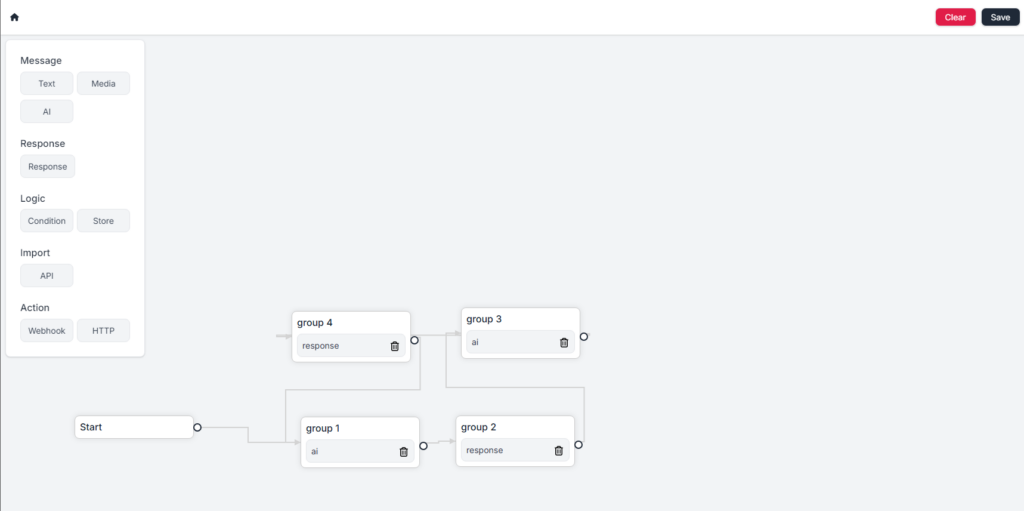
by creating the flow, your ai is ready to be used.
You will need quota ai to use this ai feature.
everytime you send an ai reply, your quota ai will be deducted.
you can also use your own data set you can add in the ai data menu.
with your own data, your ai will be personalized to your needs
To use this ai, it's pretty straightforward.
you can go to flow menu, then create the flow and use ai as reply.
your ai will use your own data (if any) to response to the chat.
Fonnte is does not wish to store any of your data, literally.
So, fonnte delete your data, regularly.
As per this documentation is written, these are the list and the lifecycle of how long will they stored on fonnte.
| Utilily | Lifetime | Info |
|---|---|---|
| Device | Lifetime | Device no longer automatically deleted |
| Whatsapp Session | Lifetime | If nothing goes wrong, Fonnte will keep your whatsapp session active. your session may end only when there is something wrong. most likely comes from whatsapp that terminate your session/get banned/corrupted session. you'll get notification about it when disconnected. |
| Temporary Files | 7 days | Fonnte store your files as temporary files whenever you send an attachment via dashboard or via API using parameter file. |
| Webhook Files | 30 minutes | Fonnte does not wish to save any attachment sent to you for prrivacy reason. but it is required to send the file back to you via webhook. so we store it for a short time. fonnte only store attachment if you are using webhook and ignore if you are not using webhook. |
| Scheduled Files | 7 days | Your scheduled to be sent files will be checked every minute to make sure all scheduled messages using this files is already processed. only after that, the file is deleted. |
| Account | 30 days | When the account does not have any device left (all devices deleted automatically), the timer begin the countdown to delete the account. Deleted account will also deleted all data related to the account and leave no trace the account ever existed. login reset the timer. |
This API is used to delete a message via API.
You can delete the requested message you don't want to proceed anymore or other reason EXCEPT message with status processing.
processing message cannot be deleted.
if you want to delete it, you have to disconnect your device first, the processing message will changed to pending.
This way you can delete it.
<?php

$curl = curl_init();

curl_setopt_array($curl, array(
  CURLOPT_URL => 'https://api.fonnte.com/delete-message',
  CURLOPT_RETURNTRANSFER => true,
  CURLOPT_ENCODING => '',
  CURLOPT_MAXREDIRS => 10,
  CURLOPT_TIMEOUT => 0,
  CURLOPT_FOLLOWLOCATION => true,
  CURLOPT_HTTP_VERSION => CURL_HTTP_VERSION_1_1,
  CURLOPT_CUSTOMREQUEST => 'POST',
  CURLOPT_POSTFIELDS => array('id' => ''),
  CURLOPT_HTTPHEADER => array(
    'Authorization: TOKEN'
  ),
));

$response = curl_exec($curl);

curl_close($curl);
echo $response;
If you prefer to see on postman, see here.
The token is device token. see how to get token.
Successfull response
{
    "detail": "message 1 successfully deleted",
    "status": true
}
- invalid device : invalid token
{
    "reason": "invalid token",
    "status": false
}
- invalid message id : the message id does not exist or does not belong to your device.
{
    "reason": "invalid message id",
    "status": false
}
- cannot delete message with status processing : the message is being processed. message cannot be deleted
{
    "reason": "cannot delete message with status processing",
    "status": false
}
This API is used to delete a device via API.
Before proceed, the only way to delete device is by giving correct OTP code.
The OTP code is sent to the whatsapp number on the setting menu.
<?php

$curl = curl_init();

curl_setopt_array($curl, array(
  CURLOPT_URL => 'https://api.fonnte.com/delete-device',
  CURLOPT_RETURNTRANSFER => true,
  CURLOPT_ENCODING => '',
  CURLOPT_MAXREDIRS => 10,
  CURLOPT_TIMEOUT => 0,
  CURLOPT_FOLLOWLOCATION => true,
  CURLOPT_HTTP_VERSION => CURL_HTTP_VERSION_1_1,
  CURLOPT_CUSTOMREQUEST => 'POST',
  CURLOPT_POSTFIELDS => array(),
  CURLOPT_HTTPHEADER => array(
    'Authorization: TOKEN'
  ),
));

$response = curl_exec($curl);

curl_close($curl);
echo $response;
If you prefer to see on postman, see here.
The token is device token. see how to get token.
Successfull response
{
    "detail": "device 08123456789 successfully deleted",
    "status": true
}
- invalid device : invalid token
{
    "reason": "invalid device",
    "status": false
}
This API will disconnect connected device.
<?php

$curl = curl_init();

curl_setopt_array($curl, array(
  CURLOPT_URL => 'https://api.fonnte.com/disconnect',
  CURLOPT_RETURNTRANSFER => true,
  CURLOPT_ENCODING => '',
  CURLOPT_MAXREDIRS => 10,
  CURLOPT_TIMEOUT => 0,
  CURLOPT_FOLLOWLOCATION => true,
  CURLOPT_HTTP_VERSION => CURL_HTTP_VERSION_1_1,
  CURLOPT_CUSTOMREQUEST => 'POST',
  CURLOPT_HTTPHEADER => array(
    'Authorization: TOKEN'
  ),
));

$response = curl_exec($curl);

curl_close($curl);
echo $response;
If you prefer to see on postman, see here.
TOKEN must be filled by your own token. See how to get token.
Successfull response
{
    "detail": "device disconnected",
    "status": true
}
- Token invalid : token is not valid
{
    "detail": "token invalid",
    "status": false
}
- Device already disconnected : the device is disconnected already
{
    "detail": "device already disconnected",
    "status": false
}
This API is used to add device via API, so your application doesn't have to create manually on fonnte's dashboard.
<?php

$curl = curl_init();

curl_setopt_array($curl, array(
  CURLOPT_URL => 'https://api.fonnte.com/add-device',
  CURLOPT_RETURNTRANSFER => true,
  CURLOPT_ENCODING => '',
  CURLOPT_MAXREDIRS => 10,
  CURLOPT_TIMEOUT => 0,
  CURLOPT_FOLLOWLOCATION => true,
  CURLOPT_HTTP_VERSION => CURL_HTTP_VERSION_1_1,
  CURLOPT_CUSTOMREQUEST => 'POST',
  CURLOPT_POSTFIELDS => array('name' => 'device name','device' => '08123456789','autoread' => 'false','personal' => 'false','group' => 'false'),
  CURLOPT_HTTPHEADER => array(
    'Authorization: TOKEN'
  ),
));

$response = curl_exec($curl);

curl_close($curl);
echo $response;
Available parameter
If you prefer to see on postman, see here.
The token is not device token! but account token.
You can only add up to 10 free devices.
example : you create 10 free devices for your clients, then 5 of them order and no longer free devices. so you can add 5 more of free devices.
However, you can only connect 1 free device out of all your free devices.
Successfull response
{
    "autoread": "off",
    "device": "08123456789",
    "group": "off",
    "name": "device name",
    "personal": "off",
    "status": true,
    "token": "M@N!4Yr-Vs#CPtaopCkE"
}
on successfull device creation, you can get the basic info of the device including token.
- input invalid : there is something wrong with your data
{
    "reason": "input invalid",
    "status": false
}
- unknown user : invalid/empty account token
{
    "reason": "unknown user",
    "status": false
}
- too much free device : your account has already 10 free devices
{
    "reason": "too much free device",
    "status": false
}
- device already exist : the device number is already exist, may or may not in your account
{
    "reason": "device already exist",
    "status": false
}